Description
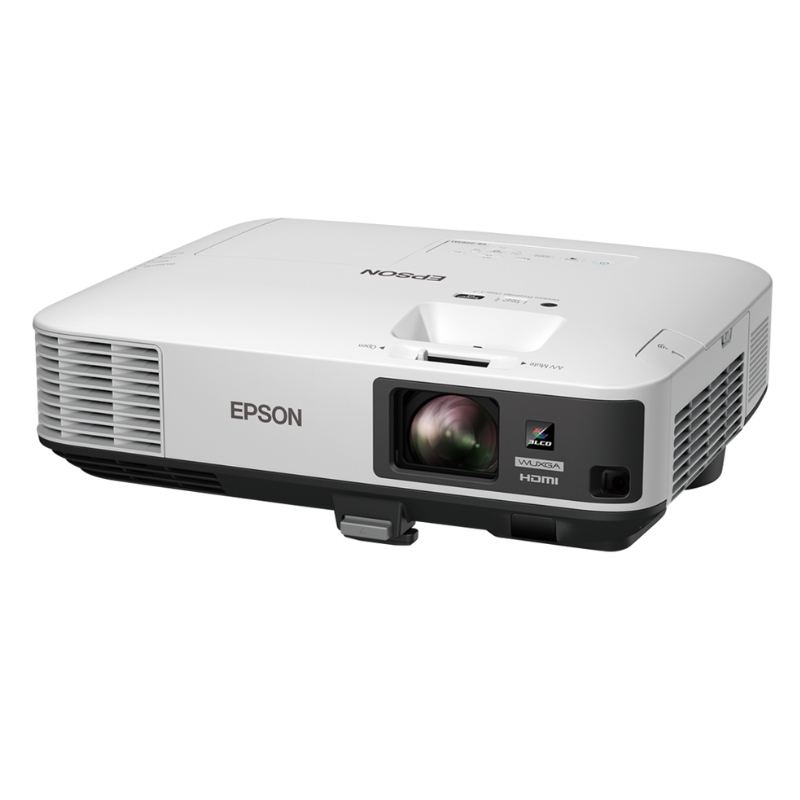
Description Of The Epson EB-2265U 3LCD Projector:
A SIMPLE GESTURE FOR GREATER CONVENIENCE
Leave the lights on and take control whether in the meeting room or classroom. Epson’s EB-2265U projector is engineered to shine outstandingly even in well-lit environments to enrich your presentation experience. This projector allows a wide variety of input methods so you can project Full HD content from a wide range of devices. Your brilliant Full HD presentations are made even better and more convenient with the new gesture-control function that allows you to navigate between your slides without the use of a peripheral device.
- Beyond Full HD Resolution
- White and Colour Light Output at 5,500 lumens
- Gesture Presenter
- Wireless Projection without Software
- Multi-PC Projection
- 2 x HDMI
- Split Screen
Brilliant Presentations
Bright and Light
Even though its lightweight and compact size enables it to be carried from room to room, the projector is capable of highly visible images thanks to its high brightness and superior 15,000:1 contrast ratio. Room lights don’t have to be dimmed to see bright and clear projected images, allowing meeting participants to concentrate better for improved meeting productivity.
Beyond Full HD Resolution
Enjoy a dynamic viewing experience on a larger and wider screen size with incredible WUXGA resolution. Deliver superb high-resolution image displays from video output devices such as PCs and smart devices and watch your 3D CAD, digital broadcast, Blu-ray, Internet movies and other graphic-intensive media come to life in Full HD video.
High Quality and Cost-effective Connectivity
- Advanced connectivity features mean convenient and hassle-free projections of your presentations. With a wide-ranging interface, the projector not only corresponds with multiple conventional analogue sources, but it is also compatible with HDMI input. In addition, one of the two HDMI input terminals is MHL-enabled for the mirroring of Android mobile devices.
- Simply connect your MHL-compatible device with the MHL cable to fully enjoy your content on the big screen. What’s more, when connected, you can charge your Android mobile device and operate it using the projector’s remote control.
- EB-2265U now includes HDBaseT connectivity that can transmit Full HD video, audio and control at low cost through cat 5e/6 cables up to 100 metres.
Multi-PC Projection
With the control of a host PC, up to 50 terminals can be connected via the multi-PC projection from a single projector. The host PC acts as a moderator, selecting media from up to 4 terminals to be projected simultaneously. With the moderator function, you can maintain control and prevent tampering with what’s projected on the screen.
Split Screen
Split screen allows inputs from two separate sources to be displayed side by side on the same screen. In a video conference, for example, images of presentation materials and remote participants can be shown simultaneously.
Convenient Wireless Mirroring Projection
Project contents wirelessly from compatible smart devices and laptops without any software installation using Miracast. The technology enables easy wireless transmission of Full HD video and sound from PCs and smart devices, eliminating the hassle of a physical connection and eradicating issues with setting up. With support for screen mirroring*, projecting your tablet and laptop screens has never been easier.
Real-Time Auto V&H Keystone Correction
The projector is equipped with a built-in camera to provide advanced, auto vertical and horizontal keystone correction. With this correction feature, you can conveniently position the projector anywhere in the room. Simply turn on the power and direct the projector towards the screen or wall, and the image will be automatically corrected in no time.
With real-time keystone adjustment, this allows the projector to display the corrected image less than a second after detecting a projector’s motion. This adjustment speed lets you display a rectangular screen even while you are moving the projector.
Screen Fit
In cases where the image extends beyond the frame of the screen or whiteboard, simply push the “Screen Fit” button to automatically adjust the image frame with the edges of the screen. This feature allows you to focus more on your presentation than on adjusting the projection output.
Epson iProjection
The Epson iProjection application enables a wireless connection for projecting images and files from your smart devices. The new “QR Code Reader” function makes this wireless connection even easier by simply reading the QR code that is projected on the screen from your smart device.
* In iProjection, projector profile search, multi-screen display, distribution function, audio transfer, movie file transfer, interrupt connection disabling and encryption data transfer capabilities are not supported.
Epson Projector Management
With Epson’s network monitoring and control software, you can see from a single PC which projectors are available and whether they are running efficiently – even across the most extensive networks. You can access, configure and control all your projectors remotely, as well as receive instant email alerts for pre-defined critical indicators such as non-functioning devices or overheating lamps. Each projector’s IP address can also be accessed remotely via a LAN connection.
Wireless Transmission
Enjoy enhanced connectivity and flexibility with Wi-Fi connectivity*. Easily share and transmit images, documents and files from your smart devices using the “Epson iProjection” application for smooth and smart projections. And with an additional attachment piece holding the wireless LAN adaptor in place, your transmissions will never be interrupted.
Reviews
There are no reviews yet.